
CircularProgressBar
import { Aside } from “@astrojs/starlight/components”; import TypeSignature from “@components/TypeSignature.astro”;
<TypeSignature typeName={ “CircularProgressBar” } typePrefix={ “class” } typeArgList={ “(value: float = 1.0, min_value: float = 0.0, max_value: float = 1.0, line_width: int = 4, line_style: Literal[‘none’, ‘butt’, ‘round’, ‘square’] | LineCap = cairo.LineCap.ROUND, pie: bool = False, name: str | None = None, visible: bool = True, all_visible: bool = False, style: str | None = None, style_classes: Iterable[str] | str | None = None, tooltip_text: str | None = None, tooltip_markup: str | None = None, h_align: Literal[‘fill’, ‘start’, ‘end’, ‘center’, ‘baseline’] | Align | None = None, v_align: Literal[‘fill’, ‘start’, ‘end’, ‘center’, ‘baseline’] | Align | None = None, h_expand: bool = False, v_expand: bool = False, size: Iterable[int] | int | None = None, **kwargs)” }> CircularProgressBar
Bases: DrawingArea, Widget
- Parameters:
- value (float , optional) — the default value to initialize this progress bar with, defaults to 1.0
- min_value (float , optional) — the minimum value this progress bar can reach, defaults to 0.0
- max_value (float , optional) — the maximum value this progress bar can reach, defaults to 1.0
- line_width (int , optional) — the width of this progress bar’s value highlight (in pixels), you can set this property via the CSS property border-width, defaults to 4
- line_style (Literal [ “none” , “butt” , “round” , “square” ] | cairo.LineCap , optional) — the style of this progress bar’s value highlight, defaults to cairo.LineCap.ROUND
- pie (bool , optional) — whether should draw this progress bar in a “pie” shape, defaults to False
- name (str | None , optional) — the name identifer for this widget (useful for styling), defaults to None
- visible (bool , optional) — whether should this widget be visible or not once initialized, defaults to True
- all_visible (bool , optional) — whether should this widget and all of its children be visible or not once initialized, defaults to False
- style (str | None , optional) — inline stylesheet to be applied on this widget, defaults to None
- style_classes (Iterable *[*str ] | str | None , optional) — a list of style classes to be added into this widget once initialized, defaults to None
- tooltip_text (str | None , optional) — the text that should be rendered inside the tooltip, defaults to None
- tooltip_markup (str | None , optional) — same as tooltip_text but it accepts simple markup expressions, defaults to None
- h_align (Literal [ “fill” , “start” , “end” , “center” , “baseline” ] | Gtk.Align | None , optional) — horizontal alignment of this widget (compared to its parent), defaults to None
- v_align (Literal [ “fill” , “start” , “end” , “center” , “baseline” ] | Gtk.Align | None , optional) — vertical alignment of this widget (compared to its parent), defaults to None
- h_expand (bool , optional) — whether should this widget fill in all the available horizontal space or not, defaults to False
- v_expand (bool , optional) — whether should this widget fill in all the available vertical space or not, defaults to False
- size (Iterable *[*int ] | int | None , optional) — a fixed size for this widget (not guranteed to get applied), defaults to None
<TypeSignature typeName={ “value” } typePrefix={ “property” } returnType={ “float” }> value
The value this progress bar is currently holding
- Return type: float
<TypeSignature typeName={ “min_value” } typePrefix={ “property” } returnType={ “float” }> min_value
Minimum value for this progress bar
- Return type: float
<TypeSignature typeName={ “max_value” } typePrefix={ “property” } returnType={ “float” }> max_value
Maximum value for this progress bar
- Return type: float
<TypeSignature typeName={ “line_width” } typePrefix={ “property” } returnType={ “int” }> line_width
The width of this progress bar’s value highlight
- Returns: progress’s fill width (in pixels)
- Return type: int
<TypeSignature typeName={ “line_style” } typePrefix={ “property” } returnType={ “LineCap” }> line_style
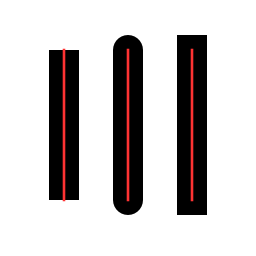
The shape of the ends of the value highlight
Possible values:
- cairo.LineCap.BUTT,
Noneand “none”: do not add extra line ends - cairo.LineCap.ROUND (“round”): add rounded caps for each end
- cairo.LineCap.SQUARE (“square”): (looks janky in the usecase of this class) add boxy caps to each end
- Return type: cairo.LineCap
<TypeSignature typeName={ “pie” } typePrefix={ “property” } returnType={ “bool” }> pie
Whether should this progress bar be displayed in the shape of a pie or not
- Return type: bool